
No products in the cart.
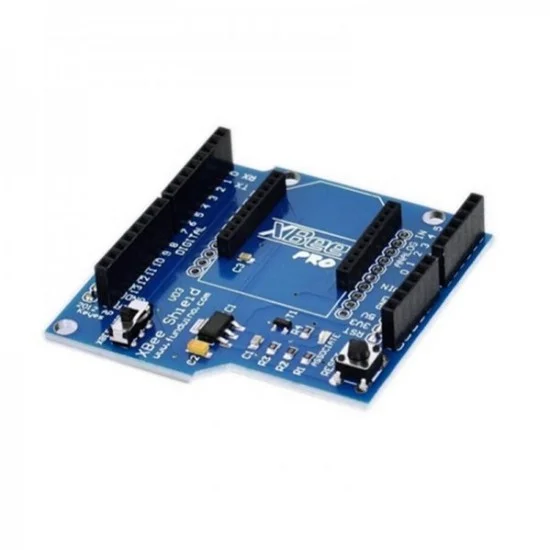
The latest Xbee Shield for Arduino price in Pakistan is Rs. 2,500/- updated on November 1, 2026.
The Xbee Shield for Arduino lets an Arduino board communicate wirelessly using Zigbee. It is a handy add-on for sensor networks, remote control and other IoT projects.
Overview
The shield uses the Xbee module from MaxStream. Indoors, the module can communicate up to 100 feet. Outdoors, it reaches up to 300 feet with line-of-sight. You can use it as a serial/USB replacement. Alternatively, you can put it into command mode and configure it for various broadcast and mesh networking options.
The Xbee shield came from a collaboration with Libelium. Libelium developed it for its SquidBee motes, which help people create sensor networks.
Pins and Headers
The shield breaks out each of the Xbee’s pins to a through-hole solder pad. It also provides female pin headers for digital pins 2 to 7 and the analog inputs. You need these headers because the shield covers those pins. However, digital pins 8 to 13 stay clear of the shield, so you can use the headers on the board itself.
Jumper Settings
In addition, the shield has two jumpers. These are small removable plastic sleeves, and each one fits onto two of the three pins labelled Xbee/USB. They decide how the Xbee’s serial link connects to the serial link between the microcontroller and the FTDI USB-to-serial chip. The microcontroller is an ATmega8 or ATmega168.
Xbee Position
- Place the jumpers on the two pins towards the interior of the board.
- The DOUT pin of the Xbee module then links to the RX pin of the microcontroller, while DIN links to TX.
- Still, the microcontroller’s RX and TX pins remain connected to the FTDI chip’s TX and RX pins, respectively.
- So data from the microcontroller goes to the computer via USB as well as wirelessly through the Xbee module.
- However, the microcontroller can only receive data from the Xbee module, not over USB from the computer.
USB Position
- Place the jumpers on the two pins nearest the edge of the board.
- In this position, the DOUT pin of the Xbee module links to the RX pin of the FTDI chip.
- Likewise, DIN on the Xbee module links to the TX pin of the FTDI chip.
- As a result, the Xbee module talks directly to the computer, but only if you remove the microcontroller.
- If you leave the microcontroller in the board, it talks to the computer normally via USB.
- However, neither the computer nor the microcontroller can then talk to the Xbee module.
Need help choosing wireless modules? Our team can help you pick the right parts for your project.




There are no reviews yet.